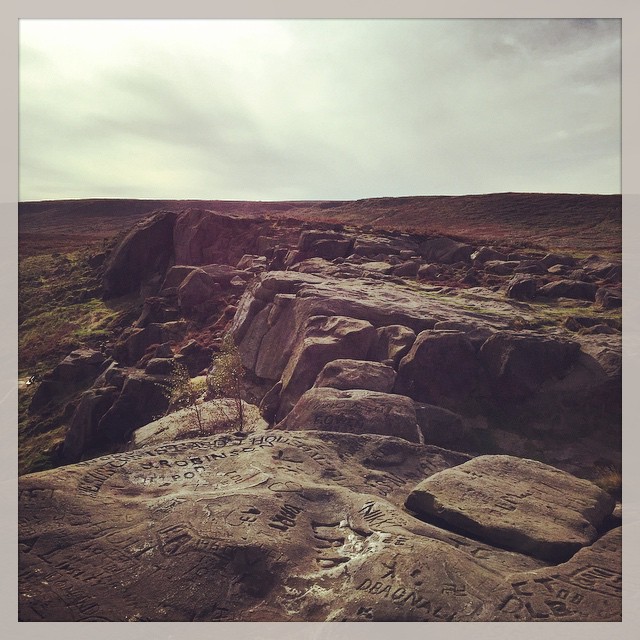
via Instagram http://ift.tt/1sX4TLm
It's the Stay Puft Marshmallow Man.
(This is the fourth of a nine part, self-indulgent series about me and Apple Macs. The previous parts can be found here: 1, 2, 3. Strap in, and please keep your arms and legs inside the vehicle at all times. You’ve been warned.)
Oh dear. Of all the whims upon which I’ve acted, of all the snap decisions I’ve ever made, this has to be the most ridiculous. And expensive. Yes, definitely the most expensive.
Allow me to set the scene. It’s the middle of June, 2007. Kath and I were no more than two weeks married. We were on honeymoon in Hawaii, on Oahu. It was bliss. The honeymoon plan was to spend a week in Oahu at the Halekulani, fly to Maui for a week at the Hyatt Regency, then home via San Francisco, with three nights at the Ritz-Carlton. The hotel details are unimportant; I just enjoy reminiscing about magical times and places (like Tahiti). Hey, it’s my blog, so you can suffer my indulgences. We’d planned out a number of things to do in Hawaii: bus tours around the islands, renting a car (a hot-dang Mustang) in Maui to drive the Hana Highway, cycling down a volcano, but had failed to book anything in San Francisco. Hearing on the grapevine that tickets to Alcatraz weren’t available to walk-up customers, only via pre-booking, we suddenly got worried as hey, you can’t visit San Francisco without seeing the island that Connery and Cage rescued from the villainous Ed Harris.
Having an irrational fear of speaking to anyone on the phone, I decided the best course of action wasn’t to simply call up the Alcatraz ticket office and book us a couple of tix, but to put to use the gadgetry I had at my disposal to procure us access via the internet. My travel bag of electronic wizardry on that trip consisted not of a cumbersome old laptop, but my new shiny toy: a Nokia N800. This Linux-powered, WiFi-enabled little gizmo was my portable internet access device in the days before I acquired my first iPhone (the iPhone 3G, a year later, would be my first iPhone – at the time of our honeymoon, the original iPhone wasn’t yet released even in the US, and was still months away from a UK release – and my phone at that time was, I think, a Sony Ericsson W850i. Nice phone, for the time.)
So having fired up the N800 and hopped on to the free hotel WiFi (the cost of which was a novelty then, as it still is now), I seamlessly browsed to the Alcatraz website using the slick, fully-featured browser. No, wait, scratch that: I slowly and painfully crawled across the internet to the Alcatraz website using a feature-free and barely functional web browser. Oh my word. The experience was terrible. Sure, I’d tested out the N800’s browser at home, doing rudimentary Google searches, checking the whether, or browsing BBC News, but I’d not used it in anger to, say, book tickets on a not-optimised-for-mobile website. That was probably the main problem with the whole shebang: back in 2007, before iPhones were a thing, and whilst iPads were still a twinkle in Steve Jobs’ eye, the concept of having a mobile-friendly website (read: a website that’s in any shape, way or form readable at 800×600 or less) was virtually non-existent. Even when the iPhone was released, many, many websites were still only desktop-friendly: hark back to Steve Jobs’ introduction of Safari in the original iPhone reveal keynote, where he revelled in the then-new concept of double-tapping on a section of content in a webpage to zoom in on only that part. This is common UI paradigm nowadays, and a helpful gesture for websites that don’t have a bespoke, small-screen version (or a responsive design), which, back in 2007, was all of the goddamned websites. The browser app in Maemo (the operating system that the N800 ran) had no such niceties and shortcuts – it was clunky, navigable only via scrollbars (no inertial flicks or pinch-to-zoom), and – possibly worst of all – very, very buggy. No amount of tapping and scrolling and cursing and sobbing could persuade the N800’s browser app to play consistently nicely with the Alcatraz website – sometimes I couldn’t navigate the dropdown menus on the site, other times I couldn’t select the day I wanted to purchase tickets for from the website’s calendar widget, and finally, having once navigated all that palaver, persuading the payment form to submit my order was step too far. The browser crashed one too many times. I needed a plan B.
Plan B involved a short walk to the Ala Moana Shopping Center, specifically the Apple Store within, to throw down a not-insignificant amount of money on a frankly-unnecessary laptop. Yup, I was enough of a grade A douche nozzle that I thought dropping nearly 10 Benjamins to solve a (non-)problem (that could otherwise have been sorted with a simple phone call) was the right thing to do. Wow. Grade. A. So that’s what we did. A couple of hours later, we were back in the hotel room, hooked up to the hotel WiFi, ordering Alcatraz tickets on an entry level, 13″ MacBook (Mid 2007) in white, glossy, polycarbonate. The specs were instantly forgettable: 2 GHz Core 2 Duo processor, 1 GB of RAM, 80 GB hard drive1. But it did the job.
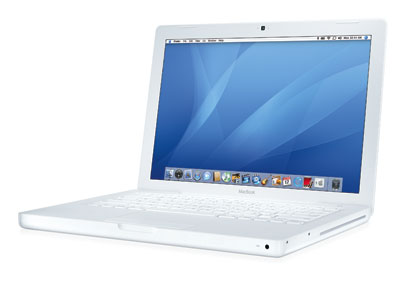
As it transpired, what started out as the ultimate in frivolous purchases quickly became my go-to machine when we returned home2. Sure, the iMac was bigger and a touch beefier, but the MacBook was super-portable, and there’s just something downright appealing about laptops as opposed to desktop machines. My only regret, in the longer term, about this MacBook was its finish – Apple also released a black matte MacBook alongside the white gloss version, which was a much more attractive finish. Surely it would be irresponsible of me to ditch the white MacBook within a year, and replace it with the black one, right? Right?
This fortnight’s Pact Coffee delivery is Sidamo, from Ethiopia.
They say:
Earl Grey tea and Garibaldi biscuits.
Flavour: Butter, Floral – Bergamot, Black Tea Finish
Sweetness: Beurre Noisette
Acidity: Mild Orange
Mouthfeel: Black Tea
We say:
Tastes like slightly weak, slightly bitter, coffee. Not a goddamn Garibaldi in sight. And what in the Sam Hell is Mouthfeel? Overall, not bad.
This review was sponsored by No Bullshit Coffee Reviews™.



My fascination with Afghanistan continues. The Places in Between, by the now-Member of Parliament Rory Stewart, is a record of Stewart’s walk from Herat to Kabul in Afghanistan in early 2002, mere months after the commencement of the War in Afghanistan. It’s a fascinating journal of an 800 km walk between a series of town and villages, in the dead of winter, across territory often still marginally controlled by the Taliban. Stewart’s letters of recommendation from earlier villages’ headmen are often the only things between a bed for the night and being left outside in the snow to fend for himself. Relying on the Islamic tradition of hospitality, he nearly always has a floor to sleep on, some bread to eat, and a roof over his head every night.
He meets a bewildering array of characters, and it’s clear he’s done his homework: a Persian speaker, he successfully manoeuvres himself into and out of situations as need be, knowing how many effusive greetings to offer to a stranger at any given time, or how to confuse parochial and threatening locals with wider-world talk.
But the villagers and headmen and soldiers and officials aren’t the only stars of this captivating travel journal. He takes in the cream of the architectural and geological wonders of the area: from the domes of Chist-e Sharif, to the empty niches of the recently-bombed Buddhas of Bamiyan, to my personal favourite, the minaret of Jam. Conservation worries aside, reading his account of climbing to the near-top of the minaret, with nary a soul around, gave me chills, and made me desperate to swap places with him, 12 years in the past, if only for a second.
There are also stark reminders of the ongoing war/invasion/occupation. Burnt husks of villages, destroyed by the Taliban. Families missing vast swathes of members, killed by the Taliban. The vast, empty caverns in Bamiyan where the Buddhas once stood. The accurate and anguished recounting of these traumas by the people whom Stewart encounters only reinforces the conditions and the time in which he’s walking, only months after the invasion started.
The Places in Between is a fantastic read. Riveting, illuminating, harrowing. And if you don’t have a tear in your eye when Stewart recalls the final fate of Babur the dog, an unwanted gift that soon becomes his valued travel companion, then you’re a brute. Read this book as soon as you can.
Are you:
If you’ve answered yes to all of the above questions, then help is at hand. Here’s how to access Siri via Bluetooth in your Ford car:
The only restrictions I’ve found with this is that it doesn’t do a good job of switching to the Bluetooth device input if you’ve asked it to play music – you still have to manually select that via the head unit buttons (or by using voice control to change input). However, it does work rather well for making phone calls.
Now if only Ford had a decent aftermarket solution to retrofit a CarPlay compatible head unit, I’d be happier than a pig in poop.
All the coffee hipsters love the Aeropress. They love the fact that not many people have heard of it (and, by definition, if they had, the hipsters would no longer like it). They love the fact that it’s quirky. They love coming up with cool new ways to brew coffee in an Aeropress (“Oh yeah, I used to brew inverted, but that’s so 2010…”1). But most of all, they love the fact that their Tonx or Kopi2 monthly gourmet coffee tastes fucking awesome when brewed in an Aeropress. Whilst it pains me to say it, the hipsters have it right on this one: the Aeropress is fucking tremendous.

Ostensibly resembling something that could be mistaken for a Swedish penis pump (um, or so a friend tells me…) the Aeropress is nothing more than a glorified plunger. The conventional way of using Aeropress is to attach the filter cap and filter to the end of the penis pump outer tube, add a spoonful or two of ground coffee, and a spoonful or two of water on top. Allow to brew for your chosen magic number of seconds, then insert the penis pump plunger, and slowly plunge your coffee through the filter and into your cup. Voilà.
Or so it should be that simple. Whilst these are approximately the instructions that are supplied with the Aeropress, it quickly became apparent to me that during the period where the coffee is brewing, sat on the filter paper and cap, a not-insubstantial amount of watery coffee seeps through the paper and into the cup. Hmmm. Not cool. This is apparently the expected behaviour, but I wasn’t happy. A quick internet search produced a solution – the inverted technique.
The inverted technique is a little more tricky, but to my knackered old tastebuds, yields a better cup of coffee. Start with the plunger inserted in the outer tube, but fully extended. Next, add the required amount of coffee, and then fill the outer tube to the brim with boiling water3. Allow to brew for a couple of minutes, all the while admiring the lack of weak coffee escaping into the cup. Next is the tricky stage: the flip. Place the filter cap and filter on the top of the inverted Aeropress, place an upside cup on top of that, then flip the whole kit and caboodle upside down so the Aeropress ends up right-way-up on top of the right-way-up cup. Now simply plunge a whole mug of coffee through the filter. Delicious.
Cleaning is simple: pop the filter cap off, throw the paper and grounds away (or into your compost bin), rinse everything off under the tap, and that’s that. Amazing.
Once you’ve got the technique down after a few trial runs, it’s a piece of cake, and only marginally more hassle than making a cup of instant coffee. And, for the record, friends don’t let friends drink instant coffee, especially when only £25 buys you one of these bad boys and upgrades your coffee experience by a couple of orders of magnitude. Run, don’t walk, to your nearest shop or e-shop and pick one of these up.
Buy it from Amazon here: Aerobie AeroPress Coffee Maker
 What Did You Do, Ray?