Macs and Me: Part 5 – MacBook 13″, Black (Early 2008)

(This is the fifth of a nine part, self-indulgent series about me and Apple Macs. The previous parts can be found here: 1, 2, 3, 4. Strap in, and please keep your arms and legs inside the vehicle at all times. You’ve been warned.)

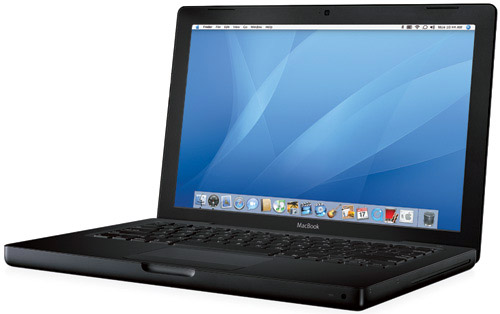
OK, maybe I exaggerated a little when referring to my previous MacBook purchase as the most ridiculous. Only a year after the purchase of a glossy white MacBook, a perfectly functional and adequate machine, did I cave and buy another laptop. This was no major upgrade; no leap to a different, superior form factor, or a larger screen, or some other suitable differentiator. No, I traded my glossy white MacBook for a near-identically specced matte black 13″ MacBook (early 2008). Yup, I changed the colour of my MacBook.

2_133599575

Sure, it had double the memory and storage, and a slight CPU speed bump, but it was, ostensibly, the same machine. But black. Matte black. It was also around this time that I picked up a matte black Epiphany Les Paul Junior1, so I must have had a thing for matte black at the time.

There’s not much more to say about this wholly unnecessary purchase. My previous perfectly adequate laptop had been replaced by a slightly more perfectly adequate one. The finish, whilst awesome looking, was just as bad at betraying greasy fingerprints as the glossy white finish, albeit in a different way. Also, this was the first machine I’d bought from the Apple Refurb Store, so it came in a slightly underwhelming plain brown box2, but a corresponding 15% reduction in the ticket price wasn’t to be sniffed at for an unnecessary purchase.

So that was about it. I passed the white MacBook down to Kath, and we finally got rid of the 12″ iBook, venerable old beast that it was.

Hi, my name is Marcus and I have an Apple buying problem.


  1. I didn’t keep the Les Paul Junior. It didn’t balance well on the strap and sounded like ass, so I took it back to the store and swapped it (plus a little cash) for a glossy black ESP LTD Viper 50. A much nicer beast all round. 
  2. Don’t let anyone tell you that unboxing an Apple product in proper Apple packaging isn’t an integral part of the Apple purchasing and owning experience. A plain brown box does take the edge off a touch. But only a touch. 

On the iPhone 6 and iOS 8

Some random thoughts about both the iPhone 6 and iOS 8, after several weeks of using both.

The iPhone 6 is too big

Not as big as the iPhone 6 Plus, obviously, but for those of who thought the 4″ iPhone 5/5S was already reaching the limits of manageability, the 4.8″ iPhone 6 initially feels far too big. This feeling is mitigated slightly by the newly-bevelled edges of the phone (where the previous generation’s edges were squared off to point of being able to do damage to particularly soft skin) which make the phone much more comfortable to handle. It encourages absently playing with the phone whilst doing something else; the iPhone 3G/3GS had a similar appeal that the intervening phones never did.

The iPhone 6 is just the right size.

Yup, it took less than a month (as it did with the transition from the 3.5″ iPhones to the 4″ iPhones) to realise that this size iPhone is the One True iPhone Size™, and all the previous iPhone sizes are noddy little toys for children. After a few weeks of using the iPhone 6, I picked up my wife’s iPhone 5S and couldn’t get over how small it felt. Strange. The most jarring comparison, though, was picking up her old iPhone 4S to reinstall it before selling it on – comically small. In the same way as we all chortle at ’80s flicks where the protagonist is chatting away on his ridiculously-sized car phone, in a few years we’ll all laugh riotously at mid ’00s flicks where phones had 3.5″ screens. Hilarious.

iOS 8 has broken my Wi-Fi.

And I’m not the only one to think so. The problem only manifests itself on my iPad Air and my wife’s iPad Mini with retina display (and not on our iPhones 6 and 5S), and only since upgrading to iOS 8. The symptoms are the same every time: I’ll be using an app that requires some kind of network connectivity and, after a while, whatever network activity is happening will suddenly grind to a halt – progress bars will stop, spinners spin incessantly – until suddenly the iPad loses its Wi-Fi connection (from a previous two or three bars). Sometimes it eventually reconnects to the access point, and at others times I have to perform the airplane-mode-on/airplane-mode-off dance to kickstart it back into life.

I’ve tried all manner of things to fix it. Some have said that resetting network settings on the device helps. Not for me. Others say that turning off Wi-Fi networking in the Location Services settings pane helps. Nope, no dice. The only glimmer of hope I have is that it might just be a 2.4 GHz vs 5 GHz problem – my Airport Express and Airport Extreme base stations have wireless networks of both frequencies, and I predominantly use the 5 GHz one (better throughput, less interference). If I connect to the 2.4 GHz network instead, however, the Wi-Fi problem frequency certainly seems to reduce, if not disappear. Which is nice.

Irrespective of whether this works around the problem or not, this is a nasty bug. I hope a future iOS 8.x update knocks this one squarely on the head.

So that’s why Apple introduced system-wide swipe gestures in iOS 7.

Really, it’s obvious now. The iOS 7 redesign introduced the concept of swiping from the left and right of the phone screen to transition backwards and forwards in the view hierarchy, in place of a dedicated back button at the top of the screen (people decried iOS 7’s ‘flatness’ as boring and unimaginative after the rich, skeuomorphic look of previous releases. Those people are idiots. iOS 7 adds far more depth than any previous release ever had by treating applications as vertical stack of views, layered upon each other on the z-axis. The system-wide swipe gesture allows movement up and down this stack (or right and left, when dealing with the actual transitions), with as many layers or levels as logically makes sense in the application in question. Smart. And certainly not flat.)

It’s quite clear now, as hindsight often is, that this shift away from a dedicated back button at the top of the view was done with one eye towards larger phones the next year, where the top of the screen isn’t necessarily the easiest place to reach (Apple even concedes this point with the new Reachability feature of the iPhones 6 and 6 Plus.) Simples.

I don’t think I’ll ever get used to the power button being on the right.

Ugh, six years of muscle memory is a whole lot of muscle memory to overcome. And I’ll guarantee that there’s never, NEVER, a day where, once I’ve remembered where the power button is, I don’t also hit the volume up button at the same time. It can’t be done.

iOS 8 extensions and 1Password is the greatest thing ever.

Finally (finally) Apple provide a mechanism that allows applications to hook into other applications. They’ve only waited 7 years, but they appear to have nailed it. 1Password is my password manager of choice, and having it easily accessible from Safari (as on OS X) is unbelievably useful. No more having to use the 1Browser app built in to 1Password, and no more having to quick-switch between applications to copy and paste a damn password. Add to this 1Password’s Touch ID integration, and we’re in password manager integration heaven.

Yup, it bends.

My launch-day iPhone 6 has a slight bend to it, most obvious if it’s placed screen down on a flat surface, where it rocks corner-to-corner. Needless to say, having only just noticed it, it’s going to be presented to the Apple Genius Bar this week for judgement1. My phone is always kept in a case, and always in the front left pocket of my trousers (or on my desk, if at work), so it’s not like I’ve manhandled the thing, or sat on it repeatedly. Annoying, yes, but if the reports of Apple replacing the not-obviously-dropped ones are true, then I can’t really complain, I guess.

It’s back to an every-other-day charge.

For me, at least, with how I use the phone, I’m back to being able to charge it every other day (I was back to daily with my old iPhone 5S and iOS 7). I don’t know whether this is due to a bigger battery, a more efficient A8 processor, or that iOS 8 has been tweaked and honed to be less power-hungry, but this is a pleasing advancement.

This is the best phone/OS combo I’ve ever used.

The iPhone 5S was awesome, but iOS 7 wasn’t totally there. The iPhone 6 is awesomer than the previous phone, and iOS 8 is appears to be very close to the goal that iOS 7 aspired to. Ultimately, It feels far more complete than iOS 7 was, and checks so many of the boxes that people had on their ‘If Only iOS Did This’ lists. It was such a comprehensive release that I’m not entirely sure what remains on those lists.

The iPhone 6 is the bigger phone that everyone wanted, in a form factor that blows the boxier 4/4S & 5/5S models out of the water2. And this is from someone who loved that boxy form factor. The way the edges of the screen curve round is aesthetic bliss; without doubt, the phone feels bigger in the hand than the previous generation but, paradoxically, also feels far more manageable and comfortable. I love it. Bending notwithstanding, there’s a fair chance that, if I was the sort of person to compile such lists, it would probably head my top-ten gadgets of all time list.
  1. I’m also taking it to the Genius Bar so they can take a look at a weird front camera misalignment problem: it looks like the camera has shifted a couple of millimetres to the left in the front case, so there’s a crescent of a couple of millimetres of housing or adhesive or similar on the right side of the camera opening. Doesn’t affect the camera at all, but it’s not right. 
  2. For the record, we don’t talk about the rear camera bulge. We just don’t. 

Macs and Me: Part 4 – MacBook 13″, White (2007)

(This is the fourth of a nine part, self-indulgent series about me and Apple Macs. The previous parts can be found here: 1, 2, 3. Strap in, and please keep your arms and legs inside the vehicle at all times. You’ve been warned.)

Oh dear. Of all the whims upon which I’ve acted, of all the snap decisions I’ve ever made, this has to be the most ridiculous. And expensive. Yes, definitely the most expensive.

Allow me to set the scene. It’s the middle of June, 2007. Kath and I were no more than two weeks married. We were on honeymoon in Hawaii, on Oahu. It was bliss. The honeymoon plan was to spend a week in Oahu at the Halekulani, fly to Maui for a week at the Hyatt Regency, then home via San Francisco, with three nights at the Ritz-Carlton. The hotel details are unimportant; I just enjoy reminiscing about magical times and places (like Tahiti). Hey, it’s my blog, so you can suffer my indulgences. We’d planned out a number of things to do in Hawaii: bus tours around the islands, renting a car (a hot-dang Mustang) in Maui to drive the Hana Highway, cycling down a volcano, but had failed to book anything in San Francisco. Hearing on the grapevine that tickets to Alcatraz weren’t available to walk-up customers, only via pre-booking, we suddenly got worried as hey, you can’t visit San Francisco without seeing the island that Connery and Cage rescued from the villainous Ed Harris.

Having an irrational fear of speaking to anyone on the phone, I decided the best course of action wasn’t to simply call up the Alcatraz ticket office and book us a couple of tix, but to put to use the gadgetry I had at my disposal to procure us access via the internet. My travel bag of electronic wizardry on that trip consisted not of a cumbersome old laptop, but my new shiny toy: a Nokia N800. This Linux-powered, WiFi-enabled little gizmo was my portable internet access device in the days before I acquired my first iPhone (the iPhone 3G, a year later, would be my first iPhone – at the time of our honeymoon, the original iPhone wasn’t yet released even in the US, and was still months away from a UK release – and my phone at that time was, I think, a Sony Ericsson W850i. Nice phone, for the time.)

So having fired up the N800 and hopped on to the free hotel WiFi (the cost of which was a novelty then, as it still is now), I seamlessly browsed to the Alcatraz website using the slick, fully-featured browser. No, wait, scratch that: I slowly and painfully crawled across the internet to the Alcatraz website using a feature-free and barely functional web browser. Oh my word. The experience was terrible. Sure, I’d tested out the N800’s browser at home, doing rudimentary Google searches, checking the whether, or browsing BBC News, but I’d not used it in anger to, say, book tickets on a not-optimised-for-mobile website. That was probably the main problem with the whole shebang: back in 2007, before iPhones were a thing, and whilst iPads were still a twinkle in Steve Jobs’ eye, the concept of having a mobile-friendly website (read: a website that’s in any shape, way or form readable at 800×600 or less) was virtually non-existent. Even when the iPhone was released, many, many websites were still only desktop-friendly: hark back to Steve Jobs’ introduction of Safari in the original iPhone reveal keynote, where he revelled in the then-new concept of double-tapping on a section of content in a webpage to zoom in on only that part. This is common UI paradigm nowadays, and a helpful gesture for websites that don’t have a bespoke, small-screen version (or a responsive design), which, back in 2007, was all of the goddamned websites. The browser app in Maemo (the operating system that the N800 ran) had no such niceties and shortcuts – it was clunky, navigable only via scrollbars (no inertial flicks or pinch-to-zoom), and – possibly worst of all – very, very buggy. No amount of tapping and scrolling and cursing and sobbing could persuade the N800’s browser app to play consistently nicely with the Alcatraz website – sometimes I couldn’t navigate the dropdown menus on the site, other times I couldn’t select the day I wanted to purchase tickets for from the website’s calendar widget, and finally, having once navigated all that palaver, persuading the payment form to submit my order was step too far. The browser crashed one too many times. I needed a plan B.

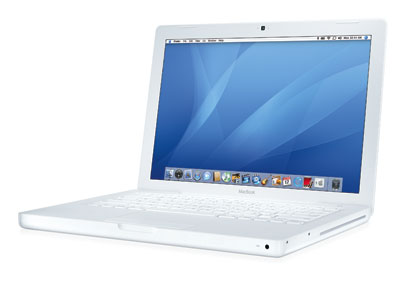
Plan B involved a short walk to the Ala Moana Shopping Center, specifically the Apple Store within, to throw down a not-insignificant amount of money on a frankly-unnecessary laptop. Yup, I was enough of a grade A douche nozzle that I thought dropping nearly 10 Benjamins to solve a (non-)problem (that could otherwise have been sorted with a simple phone call) was the right thing to do. Wow. Grade. A. So that’s what we did. A couple of hours later, we were back in the hotel room, hooked up to the hotel WiFi, ordering Alcatraz tickets on an entry level, 13″ MacBook (Mid 2007) in white, glossy, polycarbonate. The specs were instantly forgettable: 2 GHz Core 2 Duo processor, 1 GB of RAM, 80 GB hard drive1. But it did the job.

macbook_white

As it transpired, what started out as the ultimate in frivolous purchases quickly became my go-to machine when we returned home2. Sure, the iMac was bigger and a touch beefier, but the MacBook was super-portable, and there’s just something downright appealing about laptops as opposed to desktop machines. My only regret, in the longer term, about this MacBook was its finish – Apple also released a black matte MacBook alongside the white gloss version, which was a much more attractive finish. Surely it would be irresponsible of me to ditch the white MacBook within a year, and replace it with the black one, right? Right?


  1. It became a much better machine when, a few months later, I double both the RAM and the hard drive capacity. 
  2. I had a lovely honeymoon, thanks for asking. If you ever get chance to visit Hawaii, do so – it’s quite wonderful. 

How To Make Siri Work With Your Ford Sony DAB Radio

Are you:

  • The owner of a reasonably modern Ford car with a Sony DAB radio in it?
  • The owner of a reasonable modern iPhone?
  • Strangely fascinated with getting your phone to do stuff by talking at it, despite it taking much longer (and being way more error-prone) than actually tippety-tapping your way around the user interface?
  • Pissed that you can’t make your aforementioned iPhone do the aforementioned Siri stuff in your aforementioned car whilst hooked up via Bluetooth?

If you’ve answered yes to all of the above questions, then help is at hand. Here’s how to access Siri via Bluetooth in your Ford car:

  1. Hit the ‘Voice Control’ button.
  2. Say ‘Mobile name’.
  3. Wait for the Siri beepy noise.
  4. Say what you want at Siri.
  5. Sit back and be amazed – amazed, I tell you – as Siri splutters into life, misunderstands what you asked for and, instead of calling your Mum, plays your Celine Dion collection[^1] at full volume on repeat.

The only restrictions I’ve found with this is that it doesn’t do a good job of switching to the Bluetooth device input if you’ve asked it to play music – you still have to manually select that via the head unit buttons (or by using voice control to change input). However, it does work rather well for making phone calls.

Now if only Ford had a decent aftermarket solution to retrofit a CarPlay compatible head unit, I’d be happier than a pig in poop.

Macs and Me: Part 3

(This is the third of a nine part, self-indulgent series about me and Apple Macs. The previous parts can be found here: 1, 2. Strap in, and please keep your arms and legs inside the vehicle at all times. You’ve been warned.)

2006 – iMac

In 2005, the small software company I worked for was acquired by a big software company. This was a good thing; our little software company wouldn’t have lasted much longer without being absorbed by a larger company with deeper pockets and a bigger sales force. As is standard in (some) acquisitions, the deal made to employees was sweetened with a retention bonus, to prevent those who may be averse to working for a larger company (usually the young ‘uns with the startup mentality) from immediately jumping ship, and as a not unpleasant welcome gesture to those old hands amongst us who are more than happy with steady, stable employment. The big company’s retention bonus was generous – without going into specifics, it was a two-parter, paid after 12 and 24 months. The result was that, in October 2006, I found myself with a sum of money with which to be frivolous (convoluting the logic of my at-that-point soon-to-be-mother-in-law’s advice that gadgets could only be acquired for Christmas, birthdays, or with bonuses, I decided that all bonuses must be spent on gadgets. Hello, syllogistic fallacy.) This was a dangerous situation for me to be in.

The 15″ PowerBook G4 was a great machine. Fast, powerful, with a great design, it had all but one thing: screen real estate. By this time, Apple was onto its fourth iteration of its ‘creativity suite’ of applications, iLife ’06, and some of the apps bundled with it were really, really good. iPhoto did an awesome job at editing and cataloging photos; iDVD was a fairly simple, but incredibly useful, DVD creation app; and Garageband was an fantastic entry-level digital audio workstation. All of these apps, whilst usable on a 15″ display, begged for something larger.

Enter the 20″ iMac.

iMac 20" (late 2006)

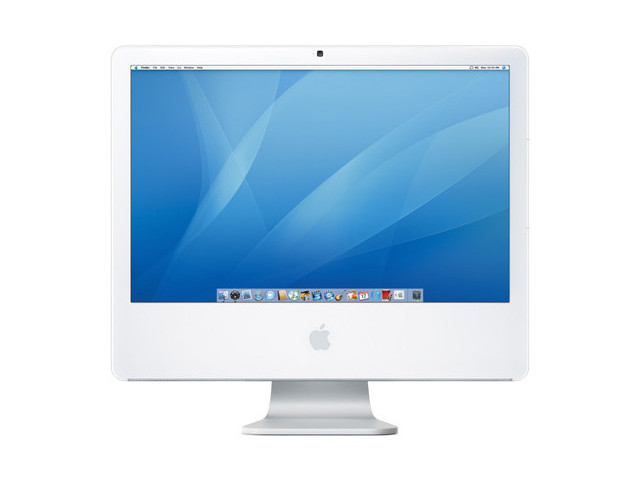
The iMac was noted for its all-in-one construction, with no separate tower. This all started with the earliest CRT-based iMac G3, continuing with the anglepoise lamp-style iMac G4, before settling on the guts-behind-the-display design of the iMac G5. As the iMacs got more refined with each generation, the size of the screen with which it came became larger. From 14″ to 15″, 17″ and 20″, by the time I started to think about an iMac, the top screen size was 24″. I decided I couldn’t quite justify a display of this enormousness, so instead opted for the slightly smaller, yet more than sufficient, 20″ model.

But screen size wasn’t the only thing that my new iMac had going for it. It was the first Mac I owned that had an Intel processor in it, specifically a Core 2 Duo, running at 2.16 GHz. This was a transition away from PowerPC chips that Apple started at the beginning of 2006 with a Core Duo-powered iMac, and finished in November the same year with an Intel-based Xserve. It was a surprising, but much lauded, move to transition from older, slower hardware, to faster, less power-hungry Intel processors. Additionally, Intel processors were more of a commodity than their PowerPC equivalents, and the hope was this would lead to lower prices on Mac hardware. I’m not sure this entirely came to fruition, especially with Apple hardware (still) carrying the unjustified stigma of being disproportionally expensive compared to similar specced rivals, but we Apple fans cling to the tired maxim of getting what you pay for.

So I ordered a tricked out iMac with a 20″ screen, 250 GB hard drive, and 2 GB of memory. I even topped it off with a DVD-writing SuperDrive, and a Mighty Mouse1 to boot. And yes, as is to be expected, the machine lived up to all expectations. It was nice to use a ‘real’ computer again, rather than balancing a laptop on one’s, well, lap, but the iMac didn’t feel like a traditional computer. The guts of the machine were right there tucked behind the display, which was most confusing to certain parental units who couldn’t fathom where I’d stashed the tower. The screen was great, making photo editing or DVD making a cinch, and the machine flew, helping me lay down a selection of musical travesties with nothing but a copy of drum sequencer Doggiebox, a TonePort GX, and a perpetually-out-of-tune guitar. Fun times.

The only seemingly retrograde step when moving to the iMac was the transition from a classy-looking aluminium laptop back to a functional white polycarbonate machine. This irked my for about 15 seconds until I swiftly forgot all about it2.

Meanwhile, the PowerBook G4 was eventually sold on, as usual, this time to a friend of Kath’s, who I believe may have only recently retired the machine3. Impressive longevity.


  1. Which turned out to be quite rubbish. The nipple wheel thing was atrocious
  2. Though my irkage was reinstated when Apple released an aluminium iMac. A classy looking machine, if ever I’ve seen one. 
  3. Interestingly, Kath passed on taking the PowerBook G4 as a hand-me-down. She preferred the 12″ iBook G4 that preceded it, and didn’t let go of that until I relinquished hold on a white, 13″ MacBook a couple of years later. But let’s not get ahead of ourselves just yet… 

Macs and Me: Part 2

(This is the second of a nine part, self-indulgent series about me and Apple Macs. The previous part can be found here: 1. Strap in, and please keep your arms and legs inside the vehicle at all times. You’ve been warned.)

2004 – PowerBook G4

When last we saw our hero, he/I had just purchased his/my first Apple computer, an iBook G4, and we had to suffer his/my dramatic gushings about how wonderful it was. (I shall now cease with the insufferable third/first person thing.)

The white plastic iBook G4 was a wonderful machine, a perfect introduction to the world of Apple computers (and, indeed, to Apple Computer, as it was still known back then). However, after using it for nearly a year, it started to feel not quite right. Sure, the white, glossy plastic exterior looked awesome against a consumer product market that was still predominantly grey or beige. And yes, with a 12″ screen, it was super-compact and portable and easier to tote around. But compared to my 3rd generation iPod (Classic), with its shiny metal back, and my iPod mini, with its brushed aluminium shell that screamed of classy industrial design, the iBook looked, well, cheap. Yes, I realise that this kind of a thought entrenches me well within the alleged snobbery that we Apple fanbois1 are supposed to partake in, sneering down our noses at the sad, blocky, beige contraptions that the unwashed masses tippety-tap away at, whilst we enlightened ones clickety-click away on our chiclet keyboards, encased within slick, laser-cut, aluminium shells, whilst being continually blown by hotties. Tragically, this image of we Mac users isn’t entirely true – some of us don’t actually use chiclet keyboards2. But Apple has a habit of making you, the consumer, expect more of a product. It’s no longer sufficient that a device is simply good enough – continued use of Apple devices make you expect a product that is exemplary, and forever improving. For the most of us, whilst every Apple product we buy we’re blown away by and seemingly most content with, there’s always a version that’s more powerful, more aesthetically pleasing, slightly further along the curve towards perfection. MacBook Airs are wonderful machines, but boy, I’d like a MacBook Pro with Retina Display. The iPhone 5c is an unbelievably good phone, but just look at how much better the iPhone 5s is. There’s always an increment.

And thus it was with the iBook G4. It was a great machine, but dear god, look at that aluminium PowerBook G4. Sure, it was pretty much the same processor generation, but twice as quick. Memory? Same amount, but faster. Storage? Twice as much. And, oh, the design. An aluminium case, brushed, that was about a third slimmer than the iBook. The backlit keyboard, which I’d convinced myself was a selling point, but the number of times I actually put that feature to good use I could count on no hands. So in November 2004, just 12 months after picking up the iBook, I was back in Computer Advantage once again, shopping for shiny. This time, I plumped for the 15″ model (despite there being a comparable 12″ model on the market), and I just didn’t know what to do with the acres of widescreen desktop real estate at my disposal. It was truly a wonderful machine3. And, due to some weird pay-it-forward kind of deal, my iBook trickled down the family chain to my wife, to serve as her introduction to the world of Apple products4.

But I’ve not drunk sufficient Kool-Aid yet to not realise the machine had flaws. Most gadgets do. Of all the Apple products I’ve had over the years, and it’s they who’ve come closest to perfection, not one of them has achieved that lofty goal. The 1st generation iPod nanos scratched easily. The iPhone 4 couldn’t make phone calls. The 3rd generation iPad (the first with a Retina display) was slow and hot. The iPhone 5‘s antenna band looked pristine and new for about 10 seconds, before it seemed to attract obvious dings and scratches by the truck-load. In the case of the PowerBook G4, or at least mine, it ran hot periodically, and when the fan kicked in to compensate it sounded like a plane taking off. The clever retracting lid latch mechanism that uses magnets and springs to extract and retract the latch when the lid is closed and opened crapped out on me in no time (first the latch bent, then decided to not engage at all.) I’m not the only one – John Siracusa went into his usual great detail about this very issue in this article at Ars Technica. And, as usual with aluminium cases, it seemed to scratch very easily. I don’t know if this is true — that it scratched more easily that my plastic iBook, or just that the iBook hid the damage better.

Notwithstanding those probably minor niggles, the PowerBook G4 was a truly great machine. Fast and powerful, with a design that was leagues apart from anything else on the market, this was a machine I was destined to keep for years. Surely.


The postscript to this particular story is that yes, spoiler alert, I did eventually get rid of the PowerBook, but it went to a good home with a graphic designer friend of my wife, who used the shit out of it over the years. I think it might actually still be in operation in some fashion, nearly a decade after it was first released. Now that’s longevity. But I bet the lid latch still doesn’t work properly.


  1. Ugh. No, really, ugh. When I’m emperor, use of the word ‘fanbois’ to describe ‘people who like and buy Apple products’ shall be punishable with no less severe treatment that death by bunga bunga. 
  2. Boom. I’ve still got it. 
  3. I suspect I shall be saying this about each of the machines I wax lyrical about in this nine-part opus. 
  4. A world that she, like me, hasn’t yet left. 

Macs and Me: Part 1

(This is the first of a nine part, self-indulgent series about  me and Apple Macs. Strap in, and please keep your arms and legs inside the vehicle at all times. You’ve been warned.)

The recent 30th anniversary of the Mac and all the surrounding commentary and reminiscing made me think about my Mac history. Whilst my Mac experiences don’t go back thirty years (only a little over ten, in fact), I thought I’d add my noise to the signal and muse upon my Mac back-catalogue.

2003 – iBook G4

This is where it all started for me. My computing experience until this point had been building PCs and loading them with either Windows (pre-University) or Linux1. My friend James had studied art at University and had come home from there a few years prior with mad Photoshop skills and an old Mac clone machine with System 7 or Mac OS 8 (I don’t remember which) on it2. I was terribly intrigued by its strange, unfamiliar GUI, its love of SCSI-based peripherals (what, you can just daisy chain the printer and the ZIP drive? Amazing…), and the peculiar one-button flipper mouse. How altogether odd.

Sometime in mid-2003, I’d just bought my first digital camera and first iPod (the 3rd generation of what is now called the ‘iPod classic’), and was having no fun whatsoever attempting to sync both of them with a Linux PC. With lingering thoughts of James’ peculiar Mac clone, I decided to take the plunge and pick up a Mac, given its claim of being at the digital hub of one’s life (or some other such nonsense; I forgot the ad campaign of the time). I picked up a couple of Mac magazines to try and suss out which model would be most appropriate, and read a number of columns excitedly mentioning the upcoming iBook G4, apparently a league apart from its predecessor’s G3 processor. It was due out in October 2003, which nicely coincided with a trip to the USA that I had planned. The dollar was at a favourable exchange rate back then, and given the alleged premium we in the UK had to pay for technology in general, and Macs in particular, it seemed a no brainer.

So I found myself in Computer Advantage on the North Tamiami Trail, just north of Sarasota, in November that year, gleefully picking up my new iBook G4. And holy hell, what a machine. It was unlike anything I’d used before. I’d prepared myself for it to handle like the old clone I’d inherited, but it came loaded with the just-released Mac OS X Panther, chock-full of shiny, sparkling gems like Safari and iTunes and Exposé and oh-my-god-did-you-see-the-dock-do-that-magnification-thing. It was an unfamiliar, exotic beast that I instantly fell in love with, if you’ll permit me to be so tragic.

I was still rocking my 3rd gen iPod at that stage, and decided to just plug it into my sparkling new laptop and see what happened. It should be unsurprising to hear that it just worked. Same with the digital camera I was toting. No need to recompile my kernel to get the Firewire drivers working. No need to compile crappy, half-baked open source applications to load songs onto my iPod. It just worked. It was, quite literally, amazeballs.

I loved that machine. Sure, it had a girth to it for a 12″ laptop. My current machine, a mid-2012 13″ MacBook Air, weighs, at 1.34 kg, around half of what that iBook weighed. And yes, the white matt plastic keyboard surround got quite grimy from my fat, sweaty wrists, but these were all matters that were by-the-by. That iBook, even with its plastic case and early-in-its-lifetime version of Mac OS X, instantly converted me, away from bloated old OSes3, or OSes with parts I had to rebuild from scratch every time I changed my digital camera, or uninspiring beige cases with all the aesthetic sensibility of a Brutalist concrete monstrosity in 1970’s Birmingham. It was the meeting of form and function, with neither sacrificed to the other, existing in harmony. The design wasn’t how it looked; it was how it worked. And it worked like a fucking dream.


  1. Around 1997, during my second year at university, my good friend Dave introduced me to Red Hat Linux 4.1 (nope, not Red Hat Enterprise Linux, nor Fedora Linux, even: the original Red Hat Linux), which I initially installed with high amusement and low expectation. I mean, seriously, did you see all those chatty boot messages fly past? And if I want to plug my USB mouse in I have to recompile what? The kernel? If a want to add a Netscape (Netscape!) launcher to my WindowMaker dock I have a edit a text file? A text file? Are you fucking kidding me‽ Eventually, though, it won me over, like it did with many computer geeks back in the day. And with people who didn’t want to either pay for their operating system or pirate one. 
  2. Years later, that Mac clone found a new home with me, during my he-with-the-most-shitty-hardware-wins phase. It proudly sat, switched off, agin an equally proud and equally switched off Sun SPARCstation IPX I’d (legitimately) liberated from a skip at work, until I finally got sick of the clutter and took them both to the tip. Farewell, sweet, yet crappy, princes. 
  3. You don’t know how much it pains me to write something as ugly as ‘OSes’, but it seems infinitely preferable to ‘OSs’ or ‘OS’s’. Sigh.